

Anki is an incredibly powerful free flashcard app that lets you create your own digital flashcards. It’s not specifically designed for language learning, although this is one of the most popular uses for it.
The app offers a lot of options for customisation, but this does come at a price, as it has a pretty steep learning curve. I’ve been using Anki for 10 years and there are still features I don’t full understand.
In this guide I’m going to briefly outline how I use Anki to learn new vocabulary and how you can use it to learn vocabulary and sentence items.
This guide is not intended as a discussion about how spaced repetition works or which specific Anki strategy or note type to use. It is simply meant as an introduction for beginners based on my own experience.
Table of Contents
Collecting Vocab
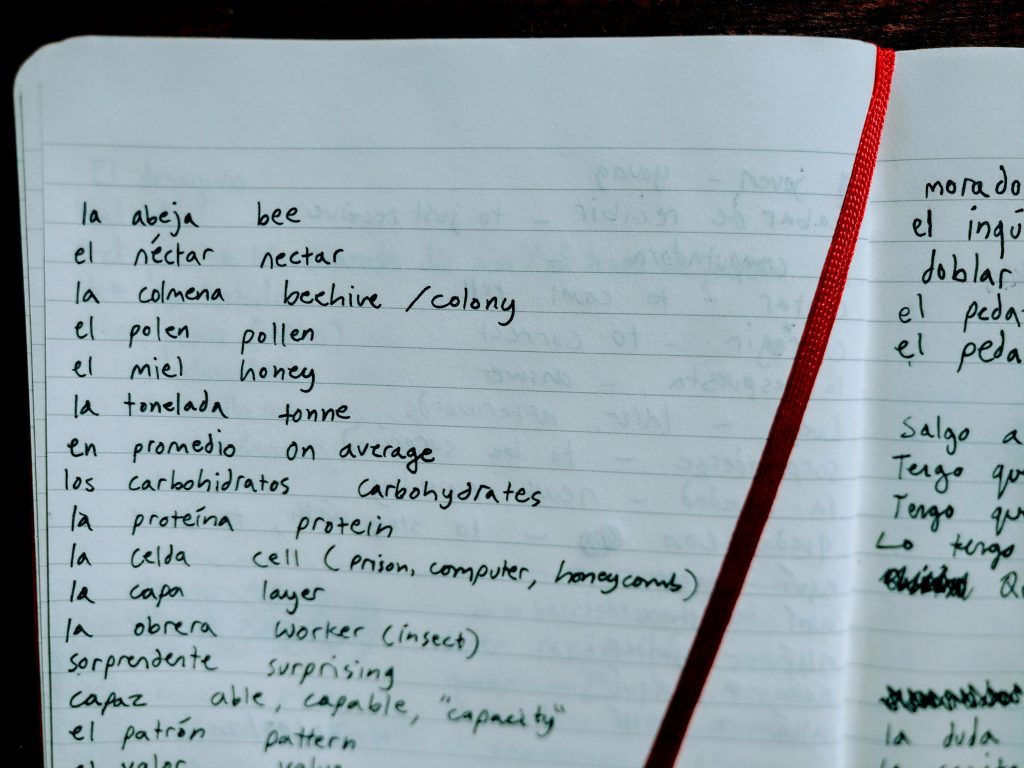
The first thing I do is collect vocab. I like to write down new vocabulary in a physical notebook as I find the process of writing with a pen helps me remember the words.
If I encounter a new word I don’t know, I write it down.
This is a recent page from my Spanish notebook. I was listening to a podcast about bees, hence all the bee words.
Looking up the Words
Once I’ve got a nice amount of words I look them up in the dictionary. This is also the time to check the spelling, accents, plurals etc. I make sure to write down everything I think is important.
Check out my vocab writing guide here so you know how not to write a German vocab list. I also have a cheat sheet which will help you write German vocab lists.
Creating Anki flashcards
Next I add the words to Anki. There are an infinite number of ways you can format your cards and notes which is covered in much more detail in the Anki user manual, so I won’t go into it here.
For simplicity I usually select Basic (and reversed card), which creates classic “paper-style” flashcards (a card for each direction English-German and German-English).
Pro Tip:
You can also create flashcards with more than two sides. This is useful if you are learning e.g. countries of the world with their flags and capital cities and want to be asked multiple things automatically. You create a note type with the questions you want (e.g. being shown the flag and guessing the country, being shown the country and saying the capital city), and then create notes for each country, e.g. United Kingdom / London / 🇬🇧. By using the note type you just created, Anki generates all of the relevant cards automatically for each country you input. Nifty!
I add the word to my German deck like this:

Selecting Basic (and reversed card) will make Anki create two different cards. First, it will show me die Fähre -n. The goal here would be to recall the meaning in English. The second card will have ferry as the question, prompting me to remember that ferry in German is die Fähre -n. This is the easiest way to learn simple vocabulary and it matches the classic paper flashcard format.
Adding example sentences
For more complex words such as verbs, I find it useful to add an example sentence. This can either be the sentence you encountered the word in, or a new sentence you found in a dictionary.
I use a different note type for sentences so they are easier to tell apart and manage, although this isn’t necessary. To create a new note type, select Tools > Manage Note Types, and then click on Add. You can either select the Basic template or Basic (and reversed card) if you want to see cards for both directions as I just described.
Don’t forget to change the note type when adding a sentence and change it back again when adding a word! If you accidentally add items as the wrong note type, you can select the cards with the wrong type in the browser and then choose Notes > Change Note Type.
You can add an example sentence for a word you just added, or a completely new sentence. I use a mix of both. If I see an interesting phrase or construction, I add a quick sentence to Anki so I won’t forget it.
Pro Tip:
Keep your sentences as short and simple as possible. Use sentences you like or find funny. This makes them quicker to review, which means you will be more likely to actually enjoy using Anki.
I usually use the default Basic note type, as I prefer to just be shown sentences in German and be tested on my ability to understand them, rather than having to produce entire sentences, which can make reviewing cards take much longer. Keep it simple and easy so that using Anki is as painless as possible!
Finding Example Sentences
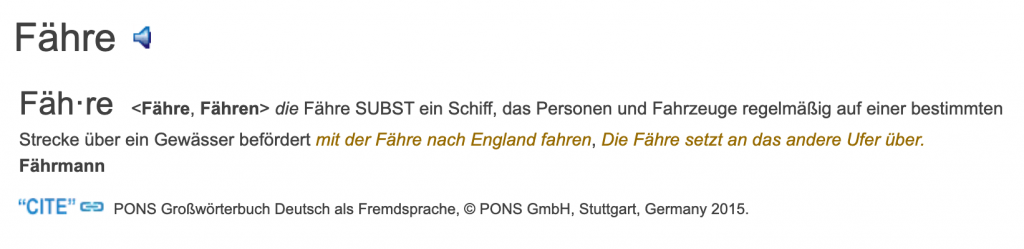
An excellent place to get example sentences in German is The Free Dictionary. As you can see here, under the entry for Fähre, there are two examples: mit der Fähre nach England fahren and Die Fähre setzt an das andere Ufer über.
If I were feeling lazy I would probably just take Ich fahre mit der Fähre nach England, but if I were in the mood to learn some some extra vocab along with the word for ferry, I would take the second sentence. I would then translate the sentence myself and write this on the other side.

You can also leave the other side blank for efficiency, as the translation is only a guide to see whether you understood the sentence correctly (unlike the single word cards we made using the Basic (and reversed card) note type, we will not be tested on English-German production – only on German-English recognition).
If you can’t remember what the sentence means when reviewing, then you can simply look up the words again, which will help cement the meaning for the next time you review the sentence. If you don’t understand the sentence without the translation, then you haven’t really learnt it yet anyway!
Reviewing Anki flashcards
Once I’ve added all the words, it’s time to review them! This is a simple process and the main function of Anki. You can review flashcards on Windows/Mac/Android and iOS.
The app is free for Windows/Mac and Android and doesn’t contain ads… this is funded by all the rich iPhone owners, for whom the app costs $25 😂😂😂 But there is a little workaround. You can simply visit https://ankiweb.net/about in your browser and review your Anki flashcards for free even on an iPhone. It just doesn’t look as nice without the app.


To review items, simply look at the question side and try to recall what the word means. Click to display the answer, and see how you did. Choose an option which corresponds to how well you were able to recall the translation.
You should be aiming to answer GOOD on most cards. If you keep failing on the same cards then you may want to make them easier or simply delete them.
If a card is really boring then it’s a waste of your time and you’d be better off doing more reading and listening and finding other words to learn. The word will come back to you in the future and it will make sense as if by magic. Sometimes we just aren’t meant to learn a certain word yet. Let it go and it will come back when it’s ready to be learnt. 🙂
Syncing
Once you’ve completed your review session, remember to sync so that your progress is saved across devices.